Free Download: Start Hacking Your Business' Growth
No, we're not talking Angelina Jolie circa 1995.

Have you heard about hacking your way to a successful business?
What if we told you that it's possible to grow your business with little to no money? All you have to do is become a hacker. Not Angelina Jolie circa 1995 cyberpunk thriller. There's no hacking into databases or leaking sensitive information.
And no, you don't need to start taking IT classes. We’re talking hacking your own marketing techniques and taking smart and strategic shortcuts that will successfully bring attention to your brand. It’s taking marketing to the next level and thinking out-of-the-box when creating campaigns.
Want to know more? Download the Growth Hacking Checklist from Above the Glass, the online platform giving women business tools and resources, below.

School of Side Hustle Lesson 3: Don't Just Build a Website. Build a Business.
The tools you need to turn your side-hustle into a full-time operation.

Hustle.
It’s a word that gets tossed around a lot. It’s part of what our Create & Cultivate x Weebly School of Side Hustle is about. And we see you. Working on your passion projects. Juggling a corporate career and your jewelry line.
Or if you’re Kelsey Kelley, founder of KKelly Designs, you’re juggling a 9-5 and your calligraphy biz. “I started KKelly Designs 3 years ago this month,” she shares. “My husband is very supportive of my side hustle and is my #1 encourager when things get hard. I also have a full time day job. I work in a mortgage office 9-5 every week day.”
As someone who has always loved, “drawing, painting, and doodling,” Kelsey says KKelly Designs happened out of a combination of two things: “my talent in art, and being too broke to afford gifts for people.” The struggle is real.
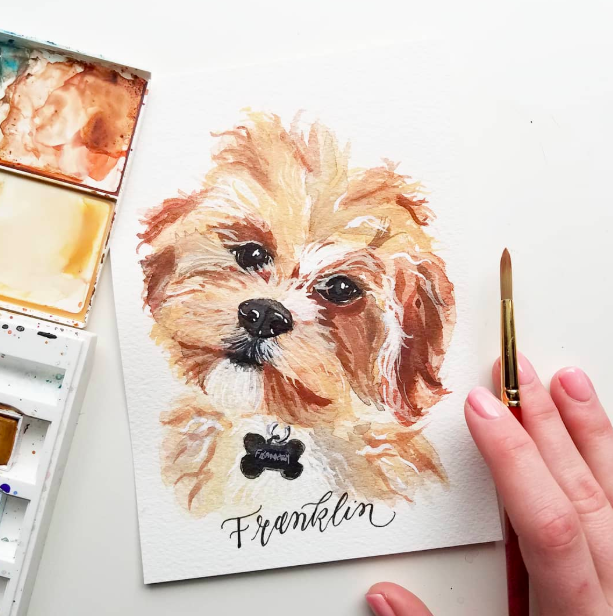

“I started addressing friend's wedding envelopes and painting their houses or pets as wedding/birthday gifts. We really didn't have ‘gifting’ in our budget when we got married,” she says of her time as a newlywed. “We were trying to pay off our student loans as fast as possible. Thankfully the additional income from KKelly Designs allowed us to pay off our loans this March - 6 years ahead of schedule!”
Which is nothing short of amazing. And that brings us to a critical turning point in our Create & Cultivate x Weebly School of Side Hustle series. You shouldn’t simply build a website, you should build a business.
Here’s why and how:

Watch: Lesson 3 Don't Just Build a Website. Build a Business
For Kelsey, KKelly Designs is built upon passion, sure, but she’s constantly learning ways to build her biz and make it better. “The hustle and the determination will set you apart,” she says. “I also believe investing in yourself and in your skill-set is huge. Whether it be by reading a book about your craft, attending a workshop/seminar or just investing time to watch YouTube tutorials! Keep pushing yourself to grow in your craft.”
Beyond growing your craft there’s also some starter business know-how that will help you expand into profitability, and perhaps, take the side-hustle and turn it into a full-time operation.
1. WRITE A BUSINESS PLAN
This is vital first step if you want the business to become something more than a side-hustle. Weebly has some amazing resources for you to checkout on how to write a business plan. Familiarize yourself with the basics below and then head to their blog where they explore the concept in more depth.
The first section is about articulating your business concept. This is where you explore your industry, your business structure, your product or service, and your plan for bringing in revenue.
The second section is about understanding your marketplace. This is where you describe potential customers and their buying habits. This section will describe and explore your marketing plan versus the competition.
The last section is about detailing your finances, where you outline your cash flow and income statements, financial projections, and investor details.
2. MONTHLY FINANCE REPORT
You can’t spend money and pretend it’s not happening. This is not your bank account during college years where your overdrawing your account was a monthly occurrence. That’s no way to run a profitable business.
Don’t let a month go by where you don’t examine your monthly spending. From there you can decide what sacrifices you have to make in variable expenses to meet your goal.
Maybe you’re spending too much on shipping. Perhaps you aren’t selling as much as you initially projected. Weebly can help with this. By using the tools already built into a Weebly sites functionality you can save money.
For example, Weebly can help you rescue a sale with an automatic abandoned cart email. Did you know that more than 69% of online carts are abandoned by shoppers? Use Weebly's abandoned cart emails to send an automated message to customers who drop out of checkout after a certain period of time. Weebly can also help you understand why users aren’t purchasing. Weebly Performance Plans allow you to track lost carts to better understand why shoppers aren't making purchases. Knowing this info just might help you close the sale, which, will ultimately shift those monthly finance reports into the green.
3. P&L SHEET 101
There are no guarantees-- that’s the name of business game since you’ve been tracking your monthly finances, you know this and you have an idea of your financial standing. However, you need to be able to track it all. What you’re spending money on. Where you’re not recouping your costs. From there you can adjust your spending for the following accordingly, and ideally, continue to turn a profit.
A Profit and Loss (P & L) statement measures a company's sales and expenses during a specified period of time, traditionally over the course of a fiscal year. The function of a P & L statement is to total all sources of revenue and subtract all expenses related to the revenue. It shows a company's financial progress during the time period being examined.
Kelsey, is confident in her choice with Weebly. “Weebly has been and still is so great for my business. It's affordable, convenient and super easy to navigate from a business owner's perspective and from the customers perspective. Someone once told me that if your website can pass the ‘mom test’ then you've got a good website.”
i.e. if mom or grandma can understand how to check out with no further instruction, it’s a winner. “Weebly,” Kelsey says, “passed the ‘mom test.’”
If your website can pass the ‘mom test’ then you've got a good website.
And if you’re thinking about the basics of time-value-money, Weebly allowed Kelsey to focus more on her art and “less time creating invoices and going back and forth with the customer about basic information about their orders.” This matters because your time as entrepreneurs is valuable. “I finally had one place where all of my information was gathered and where people could place their orders,” says Kelsey.
And she is committed. “A common trend between many successful side hustlers turned full-time business owners was their refusal to quit,” says the hustler. They don’t give up. “That has stuck with me through the times when it is hard and I feel like I am at a wall.” She relies on her ability to “just keep going forward and get back up when you get knocked down.”
Keep going forward and get back up when you get knocked down.
Kelsey is at the point where she could focus full time on KKelly Designs. “But,” she says, “I don’t want to be overconfident and go belly up. My end goal is to build a business that allows me to confidently work from home by the time we are ready for a family.”
That’s right. As this Lesson states, you need to build a business-- not just a website. “Nights are hard sometimes,” she says of her tendency to burn the midnight oil for KKelly Designs, “but, they are so rewarding because I can see my end goal in the distance.”
Have more questions, drop us a line below and we’ll get them answered!
Be sure to look back at Lesson One: Building a Brand Online, Lesson Two: From Concept to Commerce, and be sure to check in for Lesson 4: From Market, to Marketing!
MORE FROM THE BLOG





Free Weekend Download: The Business Plan You Can Use Now
Free download to get you on your A-game.

You have your BIG idea.
You've started talking to people. People are responding well. You think, I can actually do this. Create this. Start this. But then in a meeting someone asks you if you've drafted your business plan. Rewind. Business plan?
You try downloading one off the internet, and then another, but they all look so different. You wind up more confused than ever.
Business plans can be subjective, but they really should cover a set list of topics to tell the best story for themselves and any future business partners, employees, investors, etc.
From what it looks like to what it needs to include, the co-founders of Above the Glass are dishing. They created a business plan checklist to help direct your research and business plan creation.
Fill out the below to download!

NBD: Michelle Obama Is a Fan of This Duo's Newsletter
And they just released something else you need now. Right now.

Boss ladies are always looking ahead. Some of them even seem like they have the ability to see into the future.
Take Danielle Weisberg and Carly Zakin, for instance, the co-founders of The Skimm.
3.5 years ago, the two said NBC'ing you later to their producer jobs and began sending emails from their couch. Their strategy was simple: ask anyone and everyone (and everyone else's everyone) to sign-up for the The Skimm. A daily newsletter presenting a solution to keeping up with the (Dow) Jones, the Times, the HuffPo, the never-ending news chain, ad infinitum. The result was curated aggregation at its finest. A one-stop read of headlines and need-to-know info for on-the-go-get-em women. (AKA, your busy boss self.)
From their couches to Oprah's, their risk paid off. They now have over 3.5 million (#yaycongurentnumbers) active and highly engaged subscribers, the likes of whom include the two biggest Os in the game: Michelle Obama and yes, Oprah.
So this week when they announced their newest venture, we knew it would be good.
While The Skimm focusses on keeping you up to speed on current and relevant headlines, their new app, Skimm Ahead, takes the concept one step further-- literally.
What is it? Skimm Ahead puts the future into the palm of your hand, synching everything you need to know with your iPhone Calendar. For just $2.99/month, Danielle and Carly are making it easier to be smarter (BLESS), Miss Cleo style. It's an app, yes, but they "think of it more as a utility" that integrates fully into your calendar. As they say, "It's like your calendar ate a smart cookie."
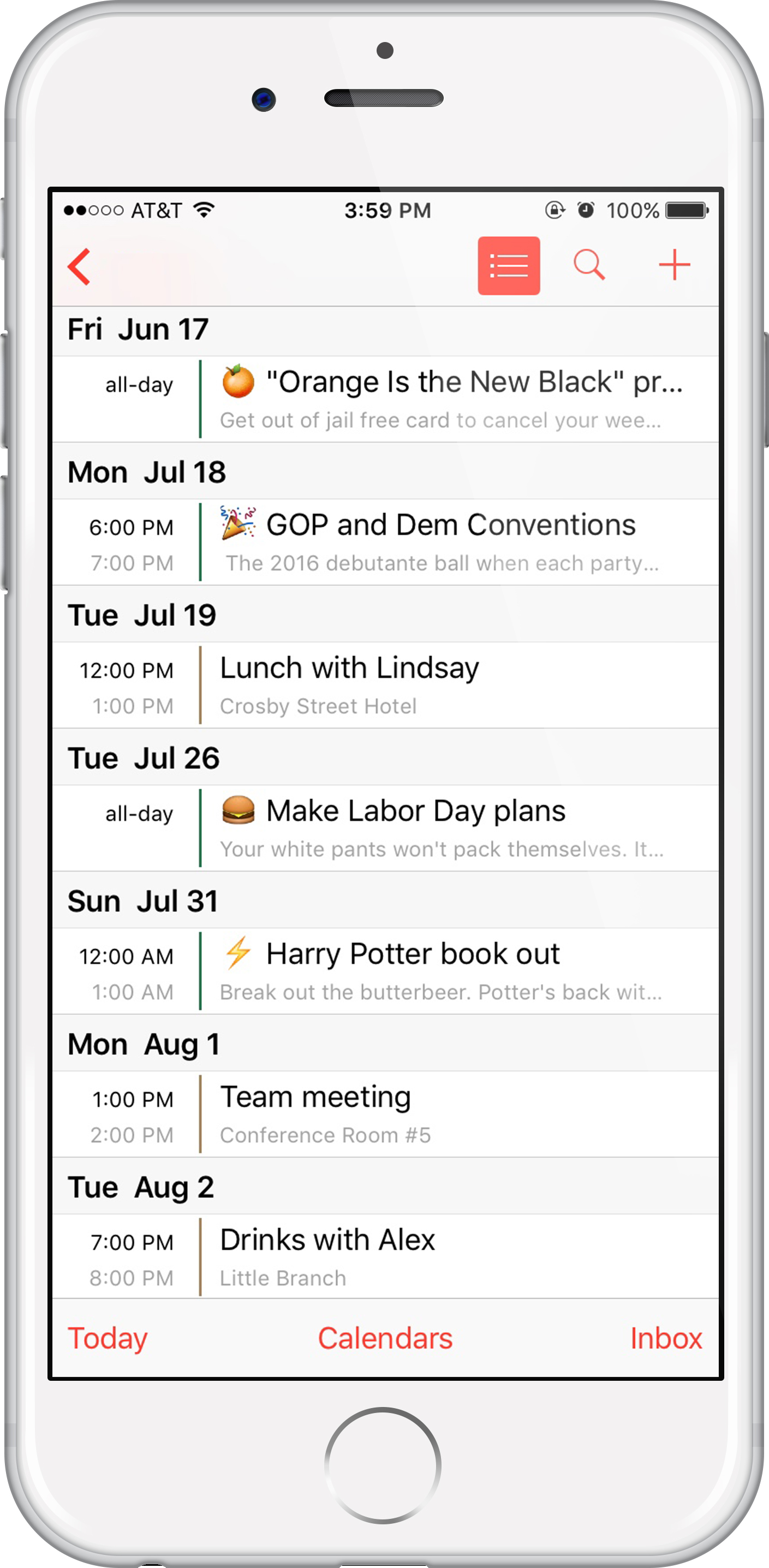
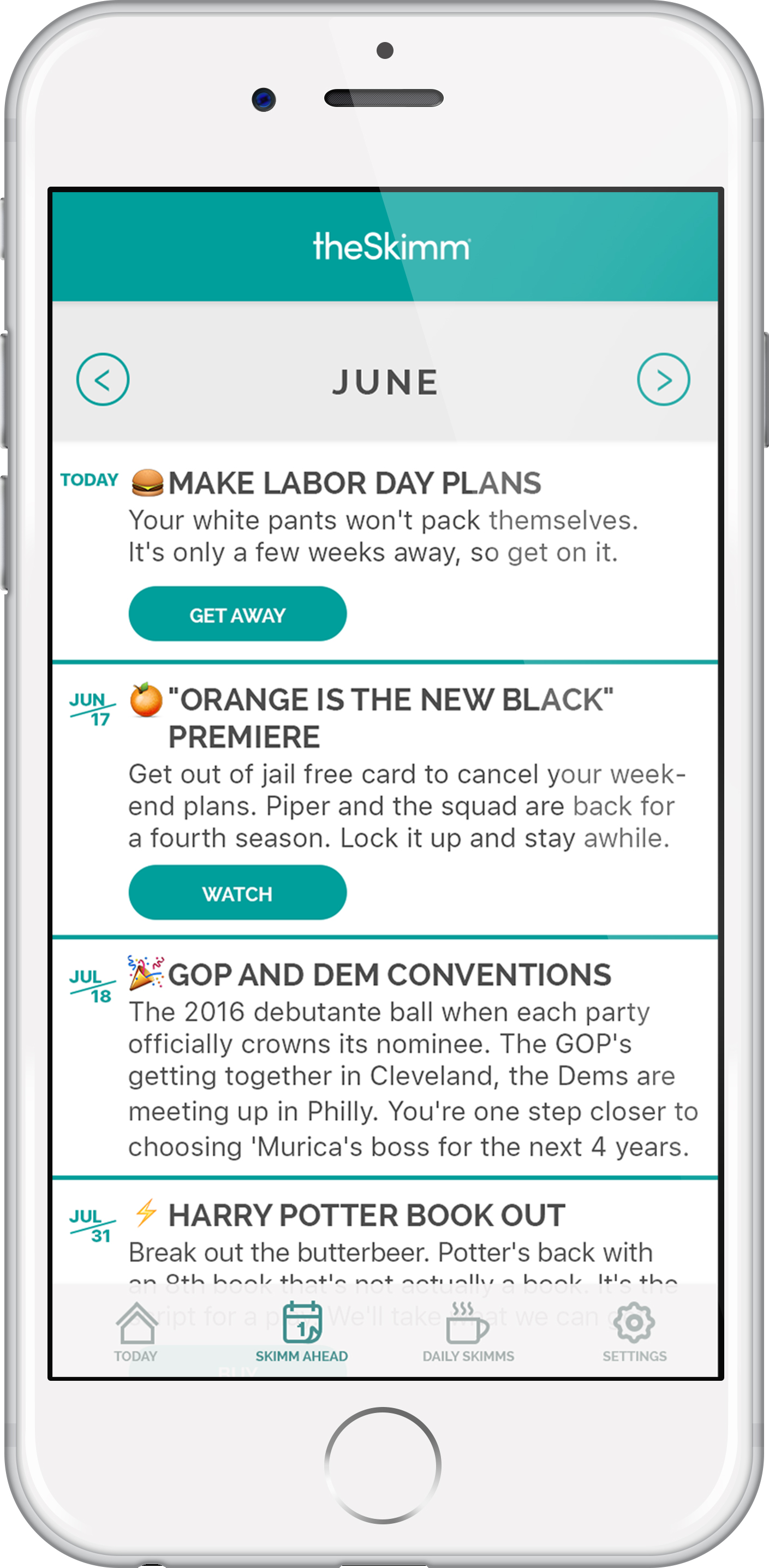
Why should you use it? Well, you'll know just when to purchase those Beyoncé tickets. Or keep you on top of the 2016 Presidential Debate schedule. It'll make sure you're Slytherin line for the much-awaited Harry Potter release. And it might even help you drop some knowledge on your boss when you suggest a campaign perfectly timed with this summer's "Orange Is the New Black," season 4 premiere.
In short: they've got Skimm in the game. And their new app is a force multiplier for keeping you ahead of yours.
Download Skimm Ahead in the iTunes App Store.
More from our blog:
Best Practices: How to Engage Users with Facebook Live
And why you should be using it now.

IN 2015 FACEBOOK VIDEO AND FACEBOOK LIVE WERE ONLY AVAILABLE TO CELEBRITIES.
But the Facebook floodgates have been opened to the masses, and the kings of social in Silicon Valley have noticed that the content that performs the best is interactive.
Facebook Live enables users to share experiences and opinions in real time, from broadcasting events to friends and family, to connecting a brand to people around the world. Consumers are engaged by events happening in real time, and Facebook has seen that on average people will watch a video more than three times longer if it's live, compared to when it is not. Which might be the best reason to start using the platform.
On average people will watch a video more than three times longer if it's live.
Tweet this.
THE BASICS: HOW TO GET STARTED

To start using Facebook Live, simply click "What's on your mind?" on the top of your News Feed. Select the Live Video icon.
BEST PRACTICES: DO IT RIGHT, DO IT RIGHT NOW.
1. Announce ahead of time when you'll be using Facebook Live: Build anticipation and excitement by letting people know when to tune in.
2. Encourage followers to subscribe so that they get notifications the next time you go live.
3. Don't go live without a point. There should be a rhyme, reason, and strategy behind your Live. Whether you're answering questions, showcasing how to use a new product, or giving a 360 fashion sneak peek, your audience should understand what the broadcast will be about. An engaging and compelling description is a useful tool for this.
4. Shoutout to people in real time with their real names. The more involved you make people feel, the stronger the sense of community you build, and the more likely people are to stick around.
5. Don't go live without a strong connection. People tend to think that using Facebook Live is perfect when they're on-the-go, but a "Broadcast Paused" message can be fatal to the success of your convo.
6. The longer the broadcast the more people you're likely to reach. People will tune in and drop off, but give an audience the opportunity to discover you. Facebook recommends going live for a least five minutes .
7. Be as creative as you can. If you're CEO of a company, host "Office Hours" where entrepreneurs can ask you questions. If you're a lawyer with a great law practice, host "Beyond the Bar," where law students can ask you about life after law school. If you're a fashion brand, take fans on a tour of your factory and show them your best practices. Maybe you're responding to backlash your brand has experienced. There are so many ways to use Facebook Live and connect it to your other social programs. So start throwing ideas at the wall.
WHY IS THIS GOOD FOR YOU BRAND?
Fractured attention spans have made capturing and engaging an online audience incredibly difficult. But Facebook Live is real time feedback. You'll see the number of live viewers, the names of people tuning in, and you can respond to real-time stream of comments. It's as close as you'll come to your audience, and they'll appreciate the effort.
It's putting the humanity back into an online and fabricated "personal" experience. Though you will most likely use strategy, it's showing that there are people behind the machine. There's a reason people tune in longer to real time video-- they want life, personality, and off-the-cuff truth that doesn't come with curated content.
Why Business Cards Still Matter & 3 Go-to Sites
Stock not an option.

Just because your entire business lives online does not mean you can’t make an impression in real life. Business cards provide an inexpensive, customized way for you to leave your mark with a new networking connection, collaborator, or client.
And since most business cards are available online, there is really no excuse not to have cute business cards—you can create a bespoke, on-brand card in less than 15minutes and for around $20. Check out these sites to get started.
You can create a bespoke, on-brand card in less than 15 minutes and for around $20.
Tweet this.
VISTAPRINT
Arguably the most inexpensive, basic business cards on the market, Vistaprint offers an affordable, professional way to get the word out about your brand. You can browse their designs or upload your own logo, and the interface is very simple. Standard cards start at just under $10.
MOO
A favorite of creatives, Moo has a clean, easy-to-use website and on-trend fonts, colors and designs. You can choose from a huge collection of the brand’s pre-designed business cards, many of which are specifically tailored to the arts, fashion, beauty and media industries. The company also has a large collection of specialty cards, like spot gloss, raised spot gloss and gold foil. Doubled-sided business cards start at $9.99.
ZAZZLE
Basic business cards at Zazzle start at $21.95, so it’s a little pricier than Vistaprint or Moo. However, Zazzle offers a money back guarantee, so if you don’t like what you create, you can send the cards back for a full refund. The company offers over 50,000 custom templates, or you can design your own.
What is your go-to for business cards? Share with us in the comments!